SnapTik is an online tool that downloads TikTok and Douyin videos without the logo (watermark), supporting HD and 4K quality, completely free. Available at snaptik.vn — no installation, no account required.
TikTok allows video downloads, but they always include a watermark — a logo, username, and more. Watching them is fine, but reusing them is problematic. SnapTik removes these elements, returning a clean original video file in HD or 4K quality.
No app installation. No account needed. Completely free.
How do you download TikTok videos without a logo using SnapTik?
SnapTik is a free online tool that helps you download TikTok videos without watermarks. You can use it on any platform, from computers to phones (iPhone, Android), without installing any software.
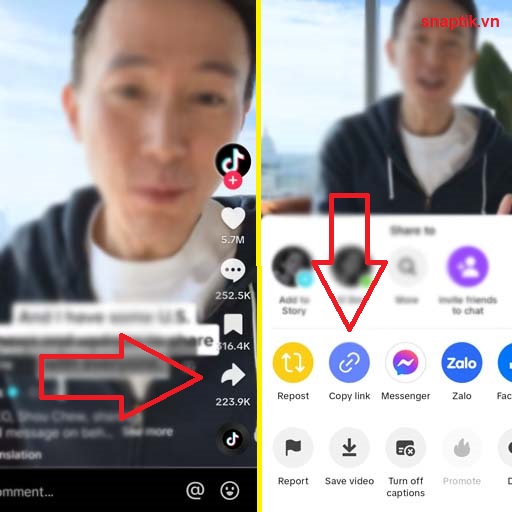
Step 1: Open the TikTok app or the TikTok.com, Douyin.com website. Find the video you want to download, tap the "Share" icon, and select "Copy link."

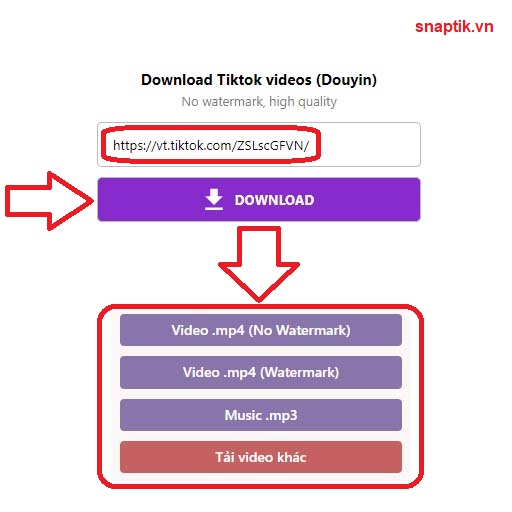
Step 2: Visit the SnapTik.vn website, paste the link into the search box, and click the "Download" button. The system will process and remove the TikTok logo in just a few seconds.
Step 3: Select your desired format (HD Video, 4K, or SnapTik MP3) to save it to your device.

Featured feature: Download TikTok photos without a logo (New)
Not only supporting videos, SnapTik has now updated the feature to download TikTok photos (Slideshow format) without a watermark. This is a rapidly growing need:
- Download TikTok photos without a logo: Retain the original resolution of the images.
- Save TikTok photos without ID: Get clean photos to use as wallpapers or reference material.
- Extreme speed: Just paste the photo album link, and snaptiktok will help you get all high-quality images.
Why choose SnapTik over other tools?
There are many tools on the internet that support TikTok video downloads, but SnapTik always maintains its #1 position thanks to its outstanding advantages:
- Original video quality: SnapTik supports direct video link retrieval from TikTok servers, ensuring image quality is not compressed or reduced in resolution. You can download Full HD or even 4K videos if the original supports it.
- No annoying ads: We optimize user experience by limiting annoying pop-up ads as much as possible.
- Absolute security: SnapTik does not require you to provide personal information, passwords, or your TikTok account. Every download process is safely encrypted.
- Multi-language support: Our system supports over 40 different languages, making it easy for users worldwide to access.
On which devices is TikTok video download supported?
Download TikTok videos on iPhone/iPad (iOS)
For iOS, you need to use the Safari browser to access SnapTik. From iOS 13 onwards, you can download files directly to your device and manage them in the "Files" app. If using an older version, you might need a supporting app like "Documents by Readdle."
Download TikTok videos on Android phones
Android users have a smoother experience. You just need to go to Chrome, visit SnapTik.vn, and perform the link-pasting steps. The video will be saved directly to the Downloads folder and appear in your Photo Gallery.
Download TikTok videos on PC and MacOS
On a computer, you only need to use any browser (Chrome, Edge, Firefox). The advantage of a PC is faster processing speed and the ability to easily manage your downloaded video library.
What other services does SnapTik offer?
Besides the main feature, we have also developed other specialized tools to meet all your needs:
- Download TikTok Stories: Save moments that only last 24 hours.
- Download private TikTok videos: Instructions on how to save your own videos when in non-public mode.
- Bulk watermark removal: (Feature in development) to help content creators manage their video libraries more effectively.
About SnapTik
SnapTik is one of the most popular TikTok video downloaders today, serving millions of users every month across more than 40 languages. The only official address is snaptik.vn — SnapTik runs entirely in the web browser and does not release a separate mobile app.
Whether you need to download TikTok videos without a logo, save TikTok clips to your device, or remove watermarks from Douyin videos, SnapTik handles it quickly while preserving the original quality.
Frequently Asked Questions (FAQ) about SnapTik
Does SnapTik support downloading Douyin videos? Yes, SnapTik fully supports downloading Douyin videos without a logo (the Chinese version of TikTok). Just grab the link from the Douyin app, paste it into SnapTik, and you're done.
Do I have to pay to use SnapTik? Absolutely not. Our service is free forever. However, you can support us by disabling ad blockers so we have the funds to maintain the servers.
Does SnapTik store users' videos? No. We do not store any videos on our servers. Every video you download is transmitted directly from the TikTok server to your device.
How many videos can I download without a logo for free? Unlimited. SnapTik does not set quotas or download limits — you can save TikTok videos without a logo as many times as you like.
Does SnapTik have a mobile app? SnapTik does not release a separate app on the App Store or Google Play. The entire service runs directly in the web browser at snaptik.vn and works smoothly on both iOS and Android with no installation required.
Can private videos be downloaded? Private videos of others cannot be downloaded. Your own private videos can be — temporarily switch to public mode, copy the link, download, and then switch back to private.