
To download a TikTok video without logo: copy the video link, paste it into the box on SnapTik and press Download — a clean MP4 lands on your device in seconds. Free, no login, no limits.
The tool saves TikTok and Douyin videos in original HD and 4K. Need another format? See download TikTok photos, download MP3, download Story or your private videos.
How to download a TikTok video without logo
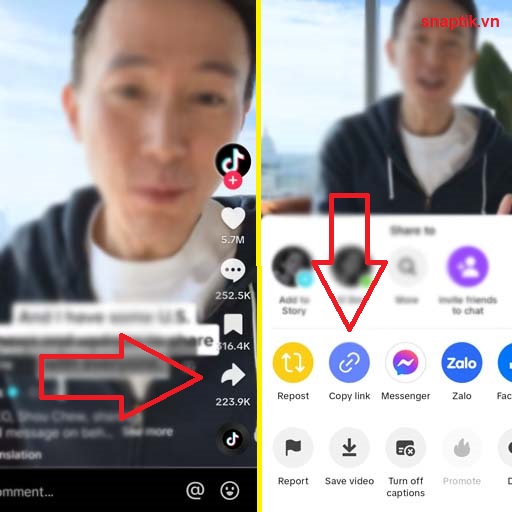
Step 1: Open TikTok or Douyin, find the video, tap "Share" → "Copy link".
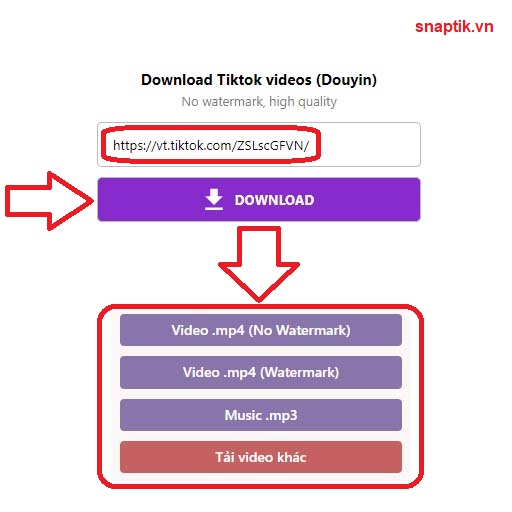
Step 2: Paste the link into the search box and press "Download". The logo is removed in seconds.
Step 3: Pick the quality — HD or 4K if the original supports it — then save the video.
Download TikTok videos on any device
- iPhone/iPad: use Safari, files save to the "Files" app (iOS 13+).
- Android: use Chrome, videos go straight to the Download folder and appear in your gallery.
- PC/Mac: any browser works, downloading TikTok videos to a computer is faster and easier to manage in bulk.
Why choose SnapTik
- Original quality: links come straight from TikTok's servers, no compression, up to 4K.
- Watermark-free: removes the logo and username stamped on the video.
- Free, no app: runs right in the browser, no account.
Frequently asked questions
Is downloading TikTok videos without logo free? Yes, completely free with no download limit.
Does it work with Douyin? Yes. Douyin is the Chinese TikTok — just paste the link and download.
Can I save high-quality video? Yes. If the original is HD or 4K, choose that format when downloading.
I only want the sound? Use download TikTok MP3 to extract the audio from the video.